Maintaining a server room is essential for ensuring the smooth operation of any organization’s IT…

How to Plan Server Rack Layout Design for Optimal Airflow: A Complete Guide
Efficient airflow isn’t just a “nice to have” in a server room—it’s the backbone of hardware reliability, energy savings, and long-term performance. Without proper cooling, servers run hotter, fans work harder, energy bills climb, and equipment fails sooner. The good news? A well-planned Server rack layout dramatically improves airflow and cooling efficiency.
In this post, we’ll walk through proven best practices for Server rack layout design for airflow.a server rack layout that keeps your equipment running cool and smoothly.
Why Airflow Matters in Server Rack Layout
Servers are designed to draw in cool air from the front and push hot air out the back. When airflow is disrupted—by cables, poorly placed hardware, or misaligned aisles—hot air recirculates and temperatures spike. This leads to:
- Higher fan speeds and energy use
- Reduced equipment lifespan
- Performance throttling
- Increased risk of thermal shutdowns
- Planning your server rack layout with airflow in mind helps prevent these issues before they happen.
How to plan Server rack layout for airflow
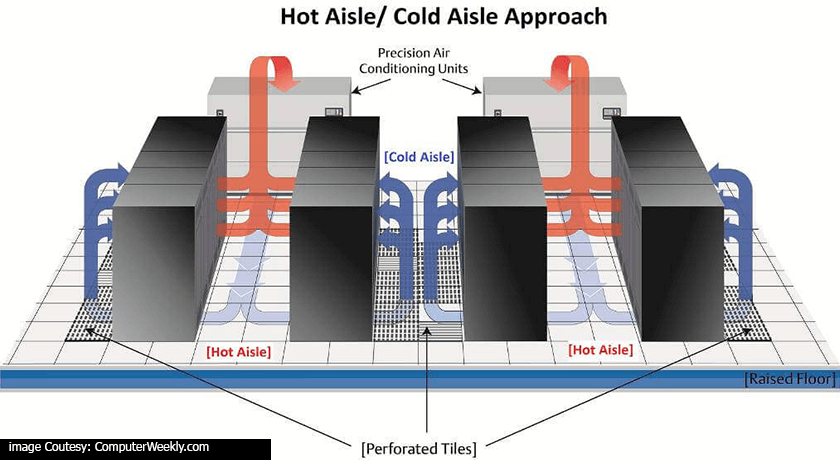
1. Start with the Room: Hot Aisle / Cold Aisle Arrangement
How the racks sit in the room is just as important as what goes inside them.
Create Predictable Airflow
Cold aisles: Fronts of racks face each other; this is where cool air is supplied.
Hot aisles: Backs of racks face each other; this is where hot exhaust is expelled.
This simple method keeps hot and cold air from mixing and improves cooling efficiency dramatically.
2. Optimize Floor Tiles (for Raised Floors)
If you use a raised floor cooling system:
- Place perforated tiles only in cold aisles
- Avoid over-pressurizing or placing perforated tiles randomly
- Seal unnecessary floor gaps to prevent air loss
3. Plan Equipment Orientation and Placement
Keep All Equipment Facing the Same Direction
To maintain the natural front-to-back airflow path:
- Orient all servers and appliances the same way
- Avoid deploying equipment with side-venting in the same rack unless you isolate it
- Reserve Intake and Exhaust Space
- Good clearance helps air flow smoothly:
- Leave 3–6 inches in front of each device
- Leave 6 inches or more behind the rack (unless using sealed cabinets or chimneys)
4. Place High-Density Gear Strategically within the Server rack layout
Heavier, hotter equipment such as:
- Compute nodes
- Storage arrays
High-port-count switches…should be installed toward the middle or lower U-space of the rack for stability and cooling efficiency.
Read: How to conduct a server room audit for maximum efficiency
5. Use Blanking Panels and Seals
Empty rack spaces create airflow shortcuts that pull hot air to the front.
The fix: blanking panels.
Why Blanking Panels Matter. They:
- Prevent hot air recirculation
- Maintain pressure differential inside the rack
- Reduce the load on CRAC/CRAH cooling units
- Also seal cable holes with brush strips to keep air from leaking between rack sections.
6. Manage Cables with Server rack layout for airflow in Mind
Cables are one of the biggest yet most overlooked airflow blockers.
Cable Management Tips
- Run power and network cables in separate vertical managers
- Avoid bulk cables blocking the rear exhaust
- Keep the center of the rack rear open for airflow
- Use short cables when possible to reduce clutter
A clean rack is a cool rack.
7. Add Internal Airflow Enhancements (If Needed)
Depending on heat load and rack density, you may benefit from extra airflow tools:
- Optional Enhancements
- Fan trays to boost vertical airflow
- Rear door heat exchangers for high-density racks
- Rack chimneys to funnel hot air directly to the return plenum
While these help, they should complement not replace good rack design.
8. Monitor Temperature Like a Pro
You can’t manage what you can’t measure.
- Install Temperature Sensors
- Place sensors at:
- The top, middle, and bottom of racks
- The front intake (most important)
- The rear exhaust
Ideal intake temperature: 18–27°C (64–80°F) according to ASHRAE guidelines.
Use Environmental Monitoring Tools
Modern DCIM systems can track:
- Hot spots
- Humidity
- Airflow obstructions
- Fan performance
Continuous monitoring helps you catch problems before they impact uptime.
READ: 8 Best Server Monitoring Tools for Small Business
9. Validate Your Server Rack Layout Airflow Design
Smoke Testing
A simple smoke pencil can visually confirm airflow patterns—revealing leaks or recirculation.
CFD Modeling
For large or high-density data centers, computational fluid dynamics (CFD) simulations provide detailed insights into airflow behavior and cooling efficiency.
Final Thoughts
Optimizing server rack airflow isn’t just about keeping systems cool—it’s about scaling efficiently, reducing operating costs, and protecting your investments. Whether you’re setting up a single cabinet or designing a full data center, these airflow best practices will help you create a stable, reliable, and energy-efficient environment.

Related Posts